![iink-logo-4C.png]](https://help.iink.com/hs-fs/hubfs/iink-logo-4C.png?height=40&name=iink-logo-4C.png)
Fee Splitting (Withhold Custom Splits)
The Fee Splitting feature allows you to control how iink fees are distributed across stakeholders during fund allocation. This gives you flexibility to assign fees to specific parties such as assigning 100% of the fee to the homeowner.
What is Fee Splitting?
Fee Splitting (also referred to as “Withhold Custom Splits”) lets you:
- Distribute funds by percentage or dollar amount
- Assign iink fees proportionally or manually
- Control exactly who pays the fee
How It Works
- Enter Distribution Percentages or Amounts
- Allocate the total funds across stakeholders using percentages (%) or dollar values ($).
- The system automatically calculates the corresponding amounts.
- Assign Fees
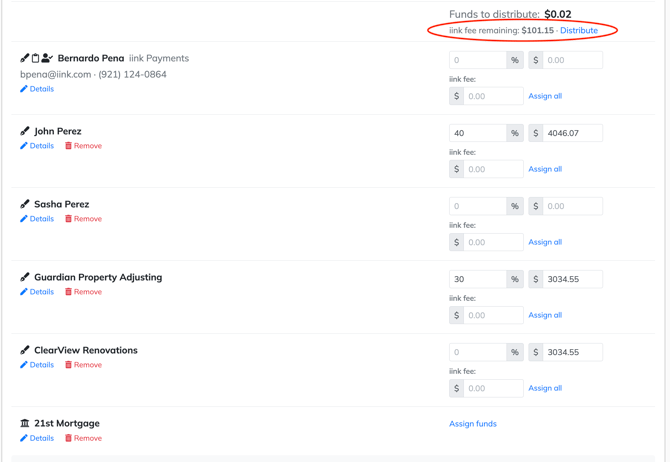
- Each stakeholder section includes an “iink fee” field.
- You can:
- Manually enter a fee amount
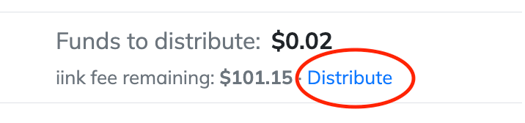
- Click “Assign all” to allocate the remaining fee to that stakeholder
- Track Remaining Fees
- At the top of the screen, you’ll see:
- Funds to distribute
- iink fee remaining
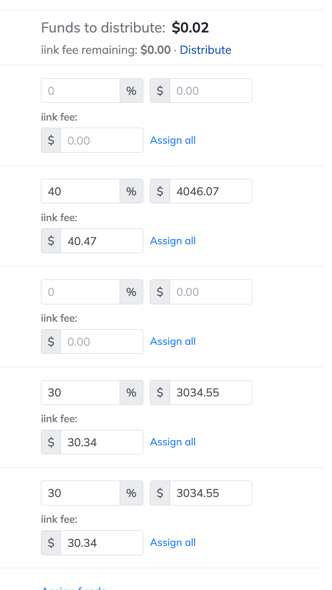
- Once all fees are assigned, this will show $0.00 remaining
- At the top of the screen, you’ll see:
- Finalize Distribution
- Ensure:
- Total percentages = 100%
- All fees are assigned
- Then proceed with the transaction
- Ensure:
Example
- Total funds: $10115.19
- Distribution:
20% → $2,023.04
30% → $3,034.56 - Fees assigned:
Stakeholder 1: $40.45
Stakeholder 2: $60.70
Common Use Cases
- Homeowner pays all fees
- Assign 100% of the fee to the homeowner using “Assign all”
- Split fees across parties
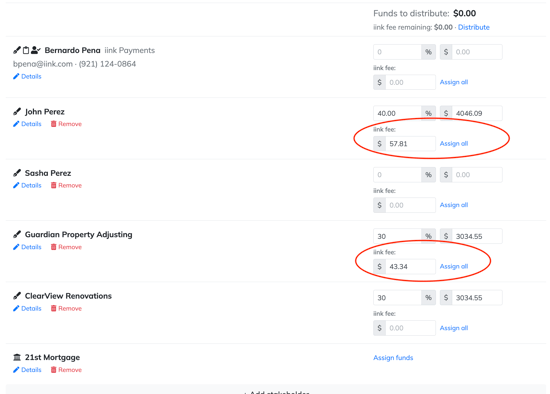
- Manually divide fees between contractor and homeowner
- Custom agreements
- Adjust fees based on deal-specific arrangements
Recent Improvements
- Cleaner stakeholder interface
- Prevents accidental assignment to insurance carriers or mortgage companies
- Improved transparency
- Fee details are now visible on signature pages
- More flexible billing
- Supports custom fee allocation across stakeholders
Tips
- Use “Assign all” to quickly allocate any remaining fee
- Double-check percentages to ensure accurate distribution
- Confirm the fee remaining = $0.00 before finalizing